RCX Accounting Mechanisms
Introduction
This guide describes the way that accruals and redemptions in the RCX system are related to their corresponding parent Activities, the Rule system that created them, as well as how the FIFO (First In, First Out) mechanism is employed during point burn.
Activity Tracking
Activity Structure
In the RCX system, activities are the basic elements of interaction. This means that in order for any rule in the RCX system to be triggered, there has to be an activity submitted to the RCX engine, which represents a customer action of interest.
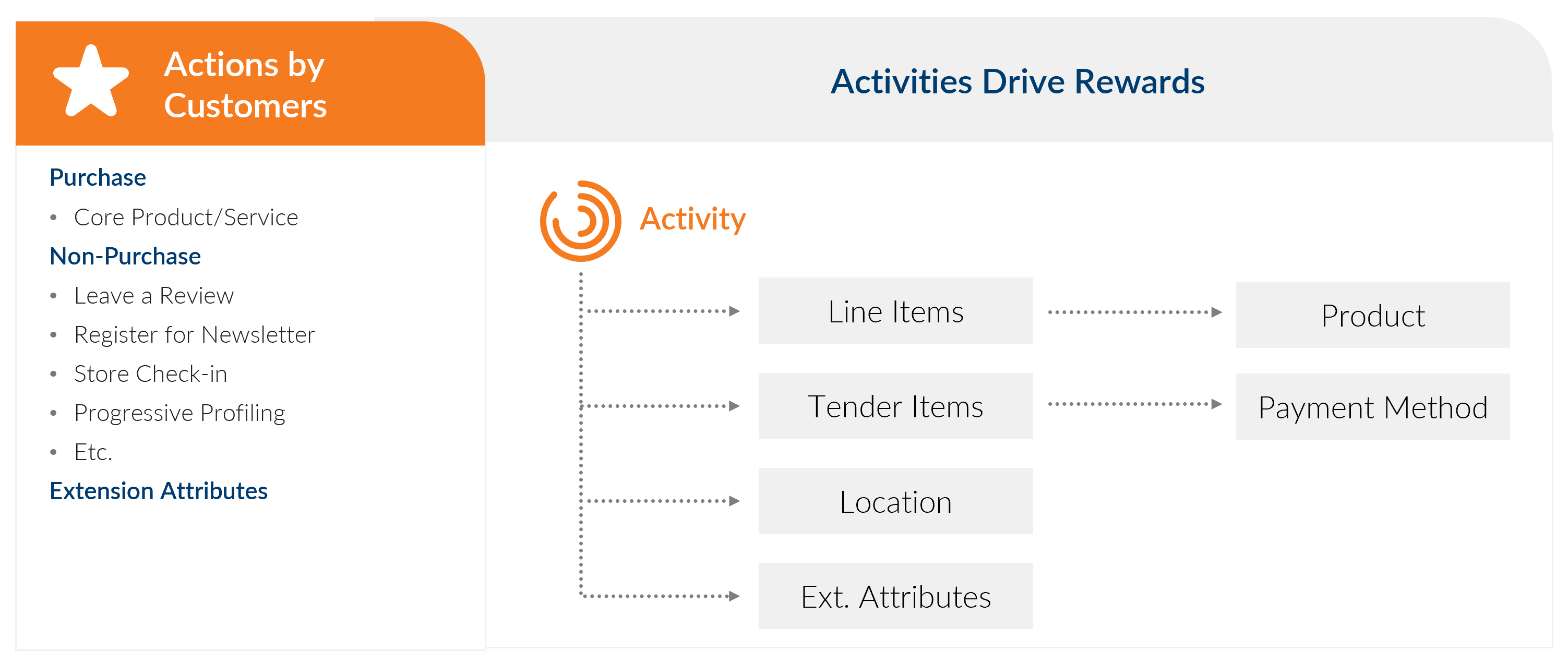
Figure 1. Activity Structure
An Activity can represent any event of interest that may result in earn and burn such as:
- making a purchase
- registering with the program
- downloading and installing a Mobile app
- checking in at a location
- redeeming points during a purchase
- redeeming points for a reward that can be used to obtain value later (for example, discounts, free items, and similar items)
- any other activity that may result in a change in the loyalty status of the customer
The Activity has a type field which is crucial as it indicates what an Activity represents - for example, Accrual, Redemption, Enrollment, and so on. These types are configurable within RCX for a specific program and can be used in reporting to group earn/burn by specific activity types.
Each such Activity object is populated with stock attributes, most of which relate to the context in which the Activity occurred. For example:
- The Activity type indicating what event took place
- The LoyaltyID of the member for whom the Activity is processed
- The total financial value and currency of the activity - could be in USD, points, or other currencies.
- The Location where the Activity took place
- The date and time of the activity, including timezone information
- The products and quantities associated with the Activity (for example, if it's a purchase)
- The payment methods used to pay (for example, co-branded credit card, cash, or other payment methods)
- A Reason/sub-reason code indicating why an activity was undertaken or in what context.
Each such activity object is also populated with extension attributes, which can be added dynamically to RCX to reflect the specifics of a given program. This allows activities to be flexible and model any event from any industry with equal efficiency - for example, we can represent a retail purchase, an airline flight, a hotel stay, a car rental, a gaming rating, and many other activities.
Accruals
When an activity passes through the RCX rule engine, it gets evaluated by the rules configured for a specific program, and if any of them are triggered, actions may be taken that earn or burn virtual currencies (points).
If a specific rule in the RCX engine has actions that earn points, and that rule is triggered by an Activity, the Activity is associated with an Accrual, which tracks that specific earn.
Each such Accrual is tagged with the id of the Rule that caused it and is also associated with the Activity in a parent child relationship.
For example, if there are two promotions modeled by RCX rules, that say:
- Promo 1: Buy a coke and get 100 points
- Promo 2: Buy a sandwich and get 200 points
And if a customer submits an activity that has both qualifying purchases, then the history of that customer in RCX contains an activity and two separate accruals:
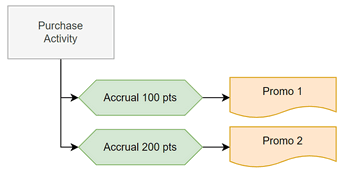
Figure 2. Accruals
Redemptions
If a specific rule in the RCX engine has actions that burn points, and that rule is triggered by an Activity, the Activity is associated with one or more Redemptions, which in turn are associated with the Accruals which were burned.
In the preceding example, let's say we have an activity that burns 150 points to pay for a purchase. If we take into account the accruals from the previous section, the system produces 2 redemptions as follows:
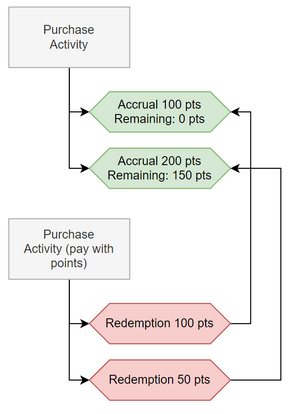
Figure 3. Redemptions
FIFO Consumption Model
In RCX, the order in which redemptions consume accruals is known as First In, First Out (FIFO). This means that a redemption consumes the oldest accruals first and then moves on to the newer ones.
During this process of consumption, accruals maintain a record of how much remaining consumable balance there is on them. Thus, it's possible that the same accrual may be consumed by multiple redemptions from multiple activities.
Here is our previous example, extended with another "pay with points" Activity that burns the remaining 150 points on the second accrual:
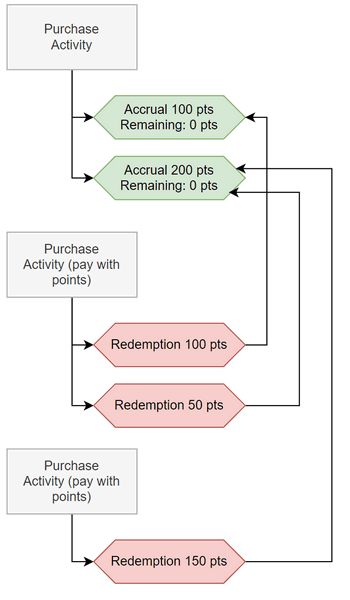
Figure 4. Allocation Example - Multiple Redemptions
It's also possible that the same burn activity, if large enough, may create redemptions to consume multiple accruals, from multiple activities that carry those accruals:
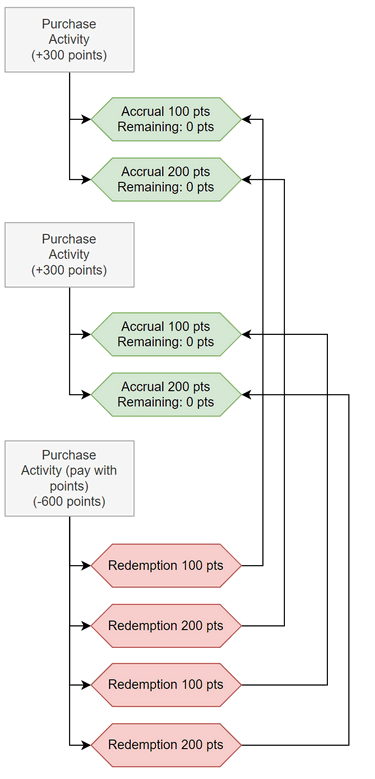
Figure 5. Allocation Example - Multiple Accruals
Handling Cancellations
In some cases, you need to back out a specific transaction, which in RCX is known as a cancellation. To achieve this, it's important to identify the original transaction that needs to be canceled.
The process is as follows:
- For each Accrual in the original transaction, the Cancel transaction creates a corresponding Redemption to offset it.
- For each Redemption in the original transaction, the Cancel transaction creates a corresponding Accrual to offset it.
- The processing status of the original transaction changes to 'Canceled'
- The Activity representing the Cancellation is tagged with the id of the original transaction creating a link between the two.
Here is a diagram to illustrate cancelling an existing earn transaction:
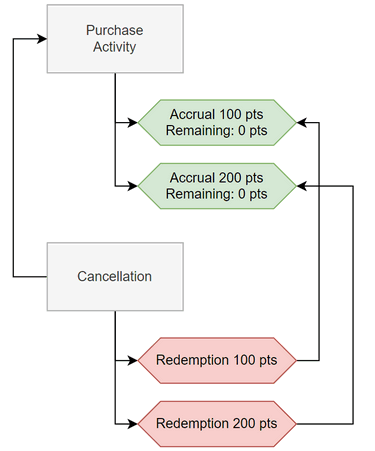
Figure 6. Cancelling an Activity
Adjustments
Within RCX, adjustments are trackable as a separate activity type. In general, adjustments are equivalent to earn/burn that's initiated manually and follows the FIFO model. However, because of their separate activity type, they can be reported.
Reason codes and sub-reason codes can also be used on the Adjustment activities to further classify them and break out reporting categories.
Breakage/Expiration
Expiration can be done in multiple ways depending on the program terms and conditions.
Activity-based Expiration
Activity-based expiration is designed to wipe out balances after a certain period of time during which no activity for the member is registered. The time period is configurable, and also the criteria by which we determine what represents "activity" are also configurable.
During Activity-based expiration, the following actions are taken:
- The system determines all members who haven't been active over a certain period.
- The system updates all the Accruals with an expiration flag and sets the date on which this happened.
- The system zeroes out the corresponding purse balance.
- The FIFO allocation mechanism doesn't consider expired accruals.
Sliding Window and Fixed Date Expiration
Often with airlines or hospitality, points expire at a fixed date - for example, the end of the year, or on a sliding window basis if they're not burned within a certain time.
Both of these within RCX, are handled in the following way:
- When an Accrual is recorded, it always carries an expiration date, which is configurable.
- The system runs a daily job, checking expiration dates and deducting balances as needed.
- The FIFO allocation mechanism doesn't consider expired accruals.