ReactorCX Security Administration Guide
This guide describes administration tasks such as setting up users and permissions, and integrating with Open ID Connect providers.
Security and Permissions Configuration
About the RCX Permission Model
RCX uses both Role-based and Attribute-based role access control (RBAC and ABAC).
-
RBAC - assigns permissions to roles, which grant create, read, write, and delete access to types of objects, such as rules, folders, programs, and so on.
-
ABAC - relies on the concept of business divisions. For example, we could have a Marketing, Merchandising and Operations division. Divisions can be assigned to users and to types of objects, for example, rules, folders, programs, and so on. If a user is in a division that's also one of the divisions assigned to an object, then that user can change that object. This allows for record-level access controls based on divisions.
User Accounts
RCX supports two modes of user authentication:
- Native - users and integrated systems submit credentials and are issued a JWT token by RCX. User accounts are directly managed in RCX. Roles and permissions are also directly added to RCX.
- OIDC - RCX can integrate with an OIDC provider, such as Okta, to provide the authentication. User accounts are managed by Okta. Roles and permissions are administered in RCX. Once Roles are established in RCX, they're linked to Okta groups. Auto provisioning is also available the first time a customer logs in.
Administering Native Users
Editing User Details
To administer users in RCX:
- Navigate to Settings -> Users in the menu panel on the left.
- To add a user, click Add User. To edit a user, click the user's name.
- Fill out the details in the User dialog box.
- Press OK to confirm changes. If this is a new user account, an email is sent to allow them to set their password.
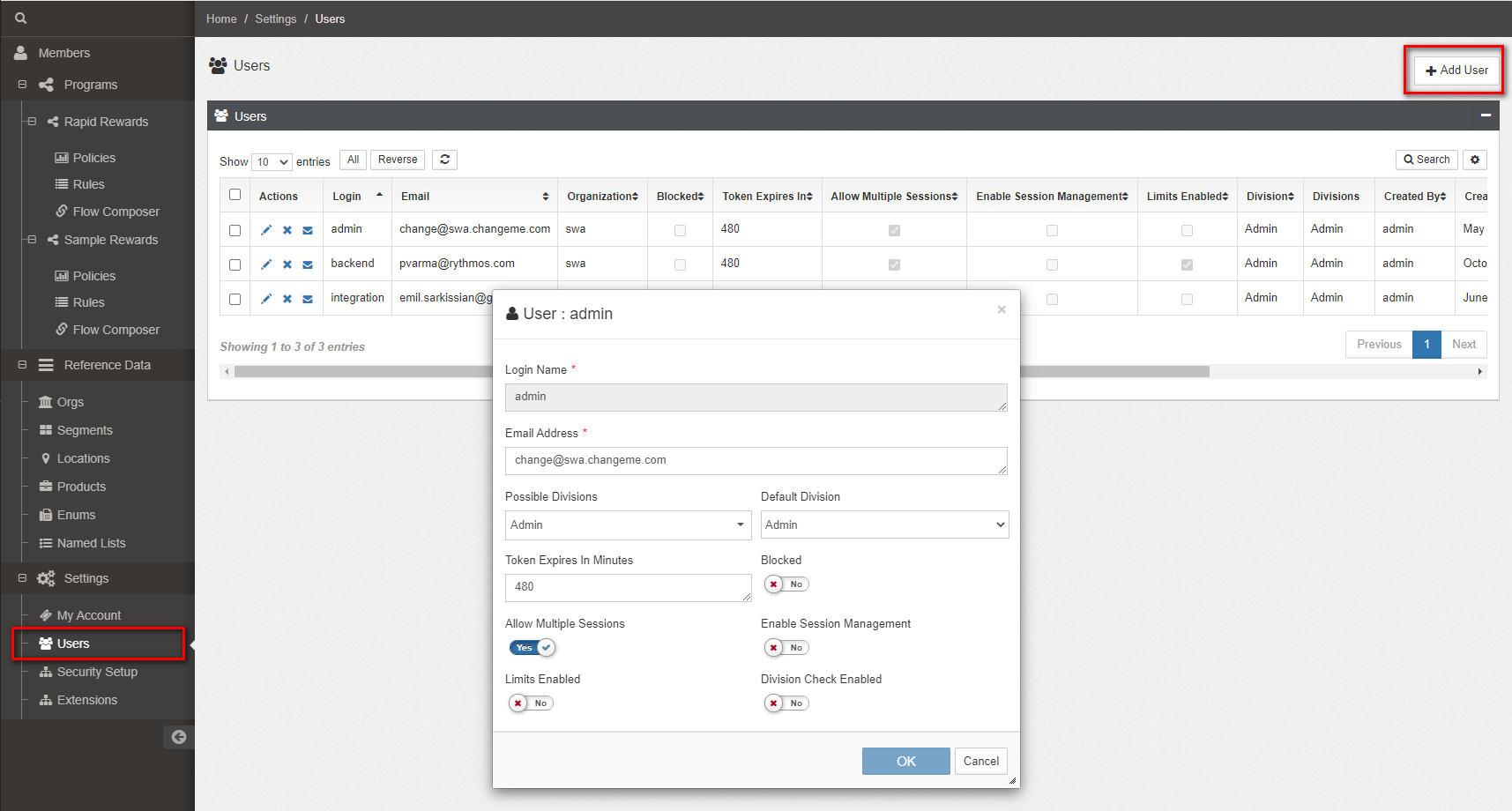 Figure 1. Adding a User
The following fields are available in the dialog box:
- Login Name - user name used to login with,.
- Email Address - email address to use for password resets, confirmations, and so on.
- Possible Divisions - which divisions this user is part of.
- Default Division - the division to which the user defaults when first logged in.
- Token Expiration - the number of minutes of token expiration.
- Blocked - if a user tries to login too many times and fails the captcha controls, this flag is set to Yes, and the user won't be able to login until an Administrator unlocks the account.
- Allow Multiple Sessions - allow user to be concurrently logged in to multiple sessions.
- Enable Session Management - used for UI-only users, this allows the token expiration time to be measured from the last access timestamp instead of from the time of login.
- Limits Enabled - whether to enable hard limits for CSRs.
- Division Check Enabled - allows turning off division checks for the user.
Viewing User based Roles and Permissions
RCX provides enhanced visibility into user permissions based on assigned roles. This feature allows users to filter and view permissions specific to each role they have been assigned.
To view permissions based on roles:
- Navigate to Settings -> Users in the menu panel on the left.
- Select a user to view their details.
- In the Users view, there is a Roles applet that displays all the roles assigned to the user.
- By default, the "Effective" option is selected, displaying all permissions available to the user across all assigned roles, along with default permissions, in the Permissions applet.
- If no roles are assigned, the user sees only the default permissions, with the role shown as "Effective".
- To view permissions for a specific role, select that role from the list. The permissions are updated accordingly in the Permissions applet.
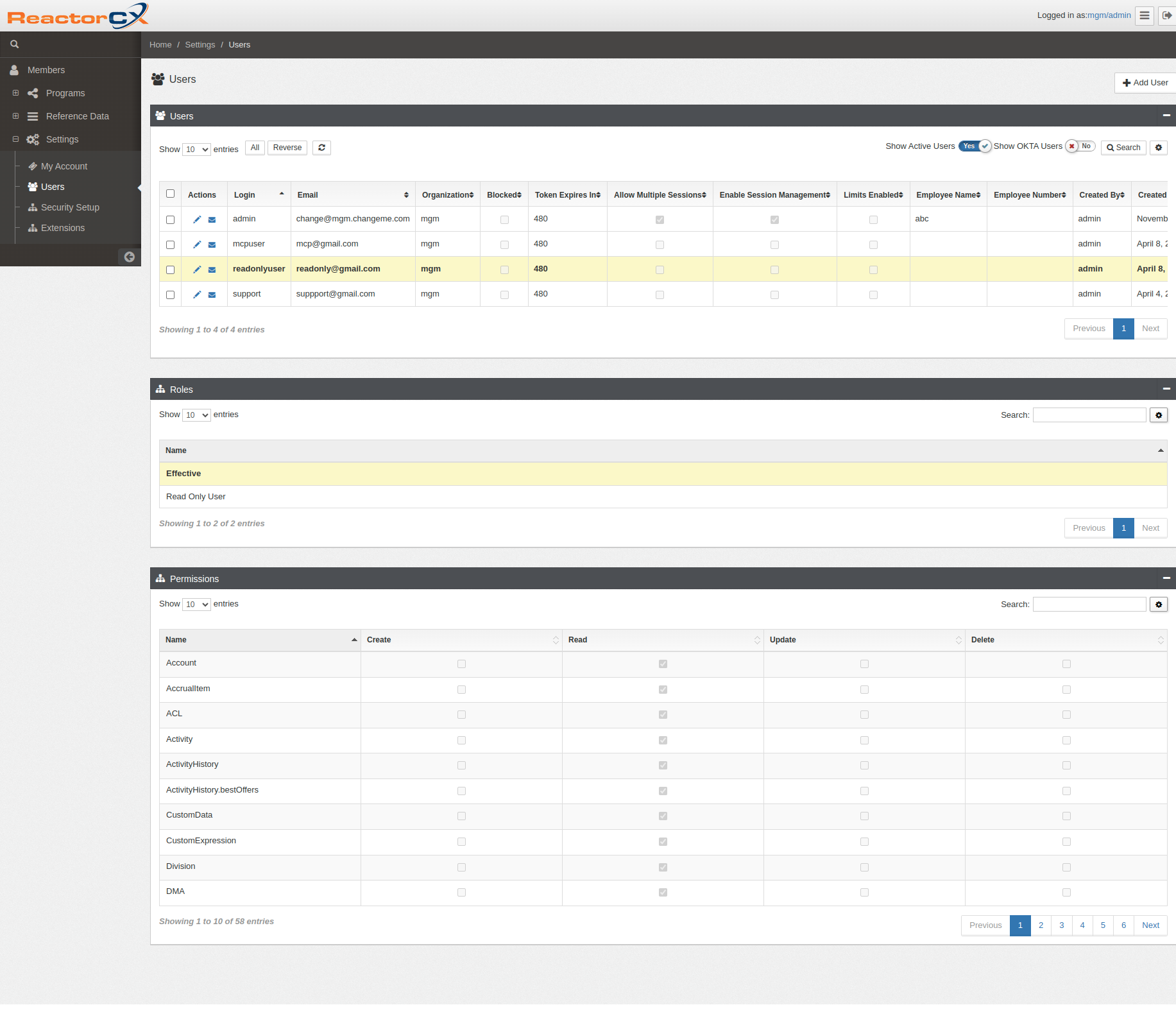 Figure 2. Viewing User Roles and Permissions
Setting up Roles and Permissions
To setup permissions assigned to Roles:
- Navigate to Settings -> Security Setup from the menu panel on the left
- Use the Roles applet to add or edit Role names
- Use the Users applet to add or remove users from the selected Role in the Roles applet
- Use the Permissions applet to assign permissions to the selected Role in the Roles applet
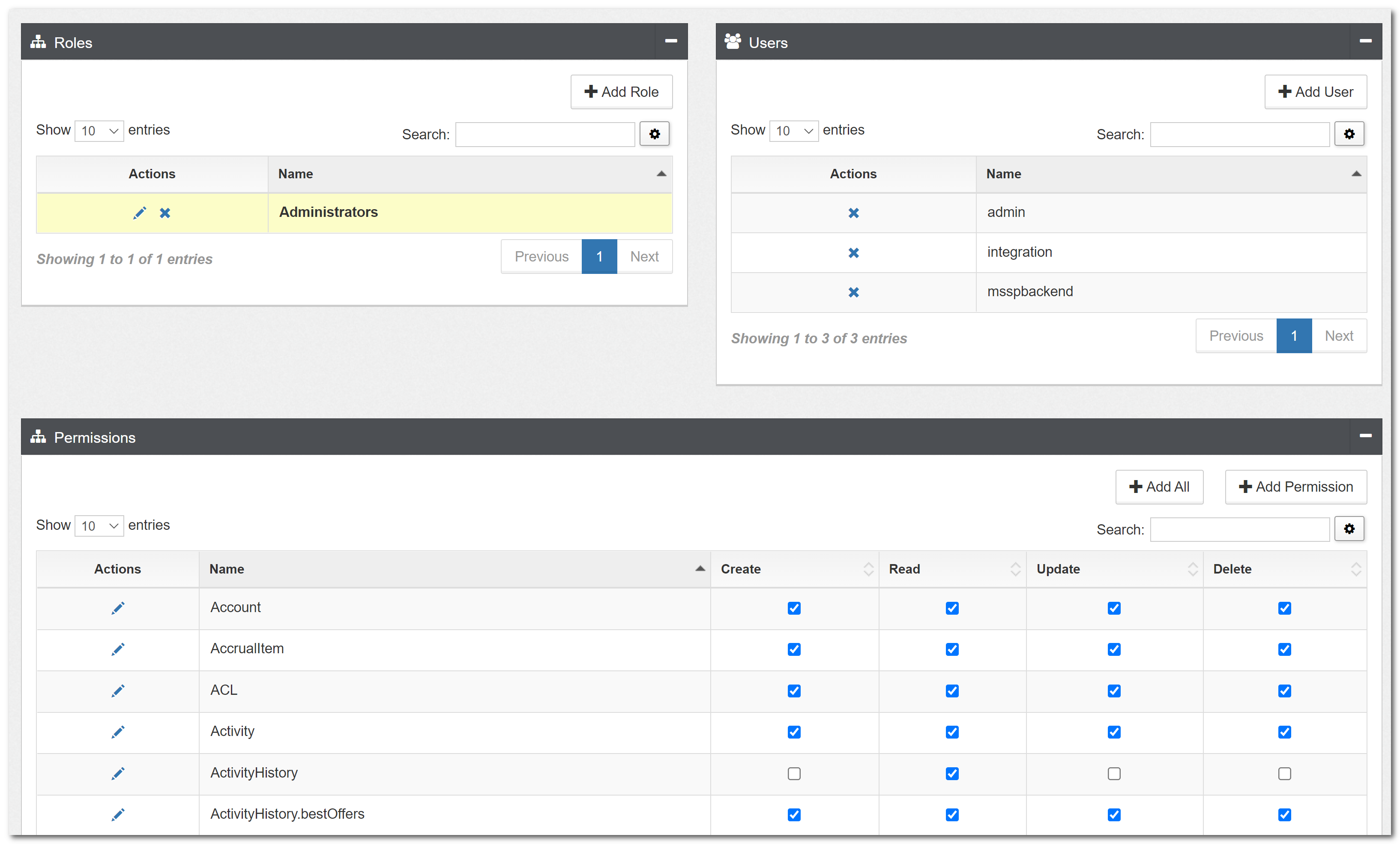 Figure 3. Setting up Permissions
Tip
Use the Add All button on the Permissions applet to add all permissions to a Role.
Managing Divisions
Divisions provide a comprehensive security mechanism that ensures data integrity and access control across the RCX system. They enable organizations to segregate data by business units, regions, or other organizational structures while maintaining referential integrity.
Overview of Divisions
The divisions system provides six key benefits:
- Data Isolation: Segregate data by divisions while maintaining referential integrity
- Division-based Access Control: Users can access and change only data within their assigned divisions
- Hierarchical Division Structure: Support parent-child relationships between divisions for organizational alignment
- Enhanced RBAC + ABAC Enforcement: Combines role-based permissions with division-level attribute controls
- Division Deactivation Constraints: Prevents removal of divisions when child data exists across the hierarchy
- Automatic Division Assignment: When division checking is enabled, user's division is automatically assigned to entities they create or edit
Division Hierarchy Structure
RCX supports hierarchical division structures that mirror organizational hierarchies and enable sophisticated access control patterns.
Creating Division Hierarchies
Divisions can be organized hierarchically using the parent field, which references another division's ObjectId:
Example hierarchy:
SP1 (Super Parent)
├── Site1
│   ├── Site1Sub1
│   └── Site1Sub2
└── Site2
    ├── Site2Sub1
    └── Site2Sub2
SP2 (Super Parent)
└── Site3
    ├── Site3Sub1
    └── Site3Sub2
Hierarchical Access Control
User Access Based on Division Position:
- Super Parent User (SP1): Can access all descendant divisions (Site1, Site1Sub1, Site1Sub2, Site2, Site2Sub1, Site2Sub2)
- Mid-Level User (Site1): Can access parent divisions (SP1) and child divisions (Site1Sub1, Site1Sub2)
- Leaf User (Site1Sub1): Can access parent divisions (SP1, Site1) but has no child divisions
Access Matrix by Entity Type:
| Entity Type | Read Access | Write Access |
|---|---|---|
| Members | No restrictions | User division + Child divisions |
| Member Data (Purse, Tier, Reward, Offer, MemberSegment, Streak, Aggregate, ActivityHistory, AccrualItem, RedemptionItem) | User division + Parent divisions + Child divisions | Activity Processing: User division + Child divisions + Parent divisions + Empty divisions REST API: User division + Child divisions |
| Reference Data (Location, Product, Segment, Program Flow) | User division + Parent divisions + Child divisions | User division + Child divisions |
| Program Components (Program, Policies, Rules, Folders) | User division + Parent divisions + Child divisions | User division + Child divisions |
| CustomExpression | User division + Parent divisions + Child divisions + Empty divisions | User division + Child divisions |
Enhanced RBAC + ABAC Enforcement
The system enforces both Role-Based Access Control (RBAC) and Attribute-Based Access Control (ABAC) simultaneously, where the attribute is a division:
Dual Permission Check:
- RBAC Check: User's role must grant the required permission
- Division ABAC Check: User's division must have the required permission flag set
Both checks must pass for the action to be allowed. If either fails, access is denied.
Example Scenarios:
- User has RBAC update permission + Division has
permissions.update = true→ Allowed - User has RBAC update permission + Division has
permissions.update = false→ Denied with error:Access denied. Your division "%s" does not have permission to update.
Division Permission Defaults:
Division-Enabled Entities
The following entities support division-based access control:
Core Program Entities
- Programs: Central loyalty program entities
- Rules and Rule Folders: Business logic and organization containers
- Policies: Tier, Purse, Reward, Aggregate, and Streak policies
- Flows: Rule execution workflows
- Custom Expressions: Custom business logic expressions
- Partners: External partner integrations
Member and Transaction Entities
- Members: Loyalty program participants
- Member Segments: Member-segment associations
- Rewards and Offers: Individual member benefits
- Purse Histories: Point transaction histories
- Streak Histories: Long-running promotion histories
- Reward Usage History: Reward redemption tracking
- Offer Usage History: Offer usage tracking
- Tier History: Member tier change tracking
- Activity Histories: Member activity tracking
Transaction and Processing Entities
- Accrual Items: Point earning transactions
- Redemption Items: Point spending transactions
- Rule Limits: Rule execution constraints
Aggregate Data Entities
- Daily Aggregates: Daily summary data
- Weekly Aggregates: Weekly summary data
- Monthly Aggregates: Monthly summary data
- Quarterly Aggregates: Quarterly summary data
- Half-Yearly Aggregates: Half-yearly summary data
- Yearly Aggregates: Yearly summary data
- Lifetime Aggregates: Lifetime summary data
Reference Data
- Locations: Store and site information
- Products: Product catalog data
- Segments: Member categorization
Creating and Managing Divisions
Adding a New Division
To create a division:
- Navigate to Settings → Divisions from the main menu
- Click Add Division
- Enter the division details:
- Name: Unique identifier for the division (such as "North America", "Finance", "Marketing")
- Description: Optional description of the division's purpose
- Active Status:
ActiveorInactivedivision - Permissions: Configure user permissions for this division (Read, Create, Update, Delete)
- Click Save to create the division
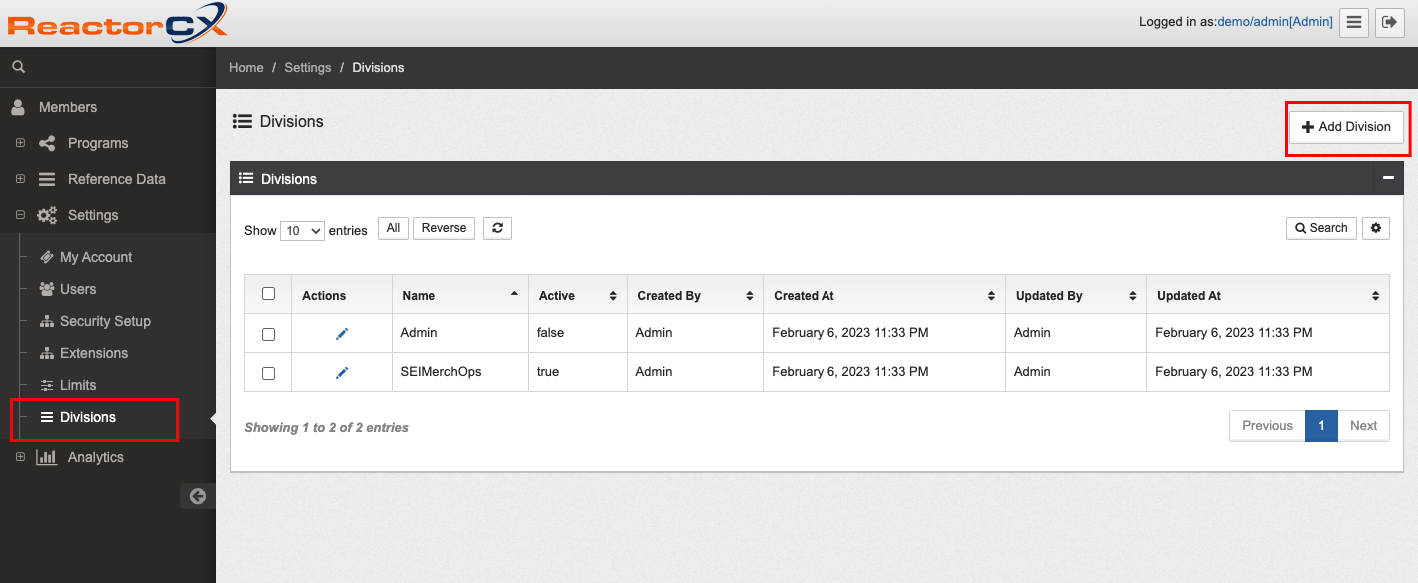
*Figure 1. Setting up divisions
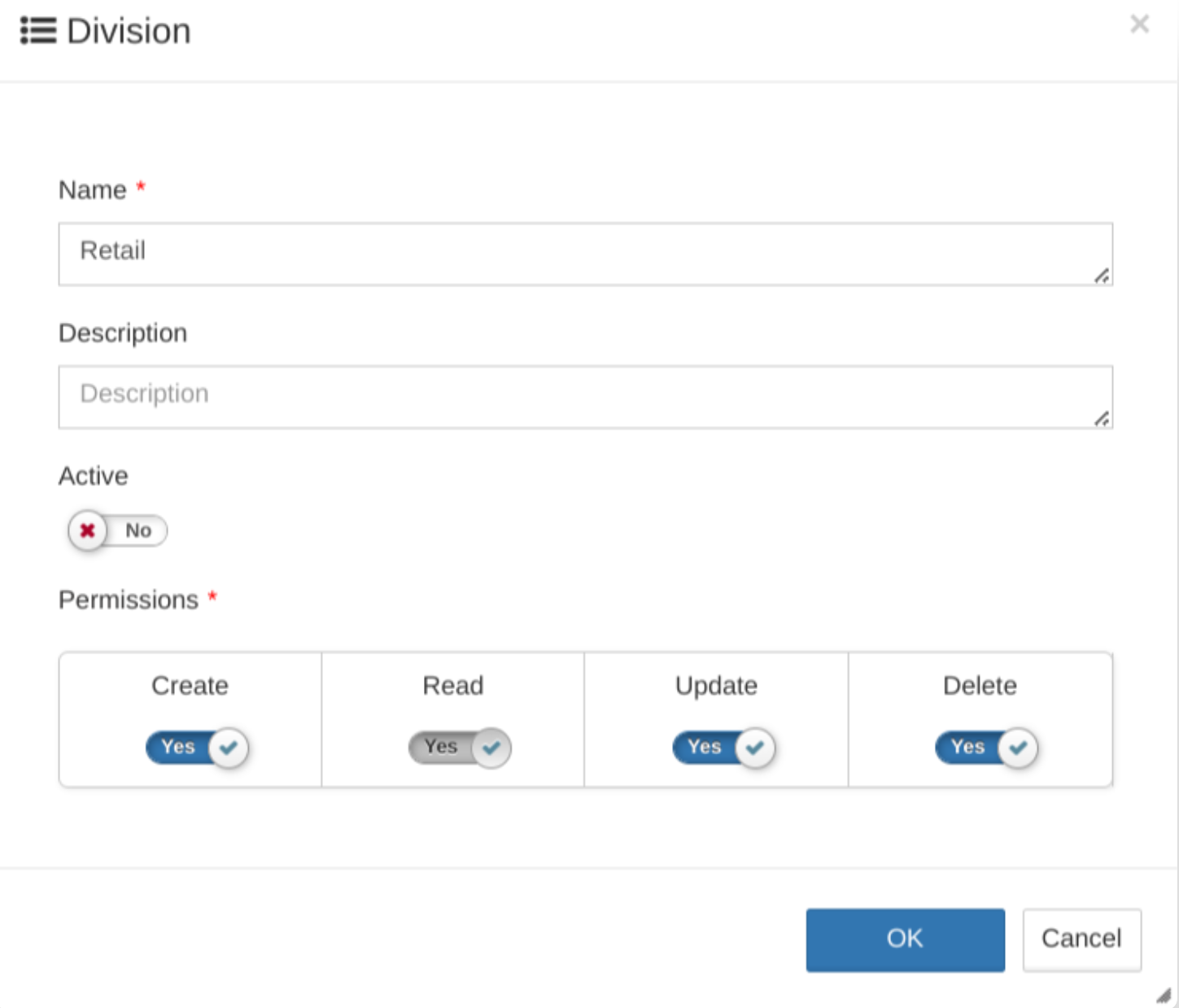
Figure 2. Adding a new division
Warning
Don't edit or delete division types if they have already been assigned to users and system objects.
Editing Division Properties
To change a division:
- Navigate to the Divisions list.
- Click the Edit icon () for the division you want to change.
- Update the division properties and permissions as needed.
- Click Save to apply changes.
Assigning Divisions to Entities
Program-Level Division Assignment
When creating or editing a program:
- Navigate to Programs and select your program.
- For the Divisions field, select one or more divisions from the drop-down.
- Save the program.
All child entities (rules, policies, and so on) created within this program inherit these division constraints.
Program Default Division for Activity Processing
Programs can specify a default division that are assigned to activities when neither the user nor the location has divisions configured. This feature is configured in the program's enrollment settings and provides a fallback mechanism for division assignment during activity processing.
To configure the default division:
- Navigate to Programs and select your program.
- Click the Options icon (:glyphicon-list-alt:) in the Actions column.
- Go to the Activity tab.
- In the Default Division drop-down, select a division from the program's assigned divisions.
- Save the program settings.
Division Assignment Priority:
When processing activities, the system follows this priority order:
- User Division: If the user has division check enabled and a division assigned
- Location Division: If the location has divisions assigned
- Program Default Division: If configured in enrollSettings
- Empty Array: As final fallback
Division Inheritance:
- All child data created from activity processing inherits the activity's divisions.
- Exception: History entities inherit divisions from their parent entities instead of activity divisions:
- RewardUsageHistory → Reward divisions
- OfferUsageHistory → Offer divisions
- PurseHistory → PursePolicy divisions
- StreakHistory → StreakPolicy divisions
- TierHistory → TierPolicy divisions
- Aggregates → AggregatePolicy divisions
This feature ensures activities have proper division assignment in environments where users might not have division check enabled.
Policy and Segment Associations in Hierarchies
Reward Policy/Rule Association with Segments
When working with hierarchical divisions, segment associations must follow specific rules:
Single-Hierarchy Associations:
If a reward policy belongs to a single hierarchy (such as Child division), associated segments can belong to any level in that hierarchy (GrandParent, Parent, Child, GrandChildren)
Multi-Hierarchy Associations:
- If a reward policy has divisions from multiple hierarchies, every associated segment must include divisions from all represented hierarchies
- Segments belonging to only one hierarchy cause validation errors
Example:
Reward Policy divisions: [Child from Hierarchy 1, Child from Hierarchy 2]
Valid Segment: Must have divisions from both Hierarchy 1 AND Hierarchy 2
Invalid Segment: Has divisions from only Hierarchy 1 OR only Hierarchy 2
Tier Policy Level Associations
Similar rules apply to tier policy associations:
- Single-Hierarchy: Tier levels must belong to the reward policy's hierarchy
- Multi-Hierarchy: Tier policies must include divisions from all hierarchies represented in the reward policy
Activity Execution with Division Hierarchy
Activity processing respects the hierarchical division structure for enhanced flexibility:
Hierarchical Activity Execution:
- Users can execute actions on entities belonging to their division hierarchy (parent and child divisions).
- Activity location divisions are expanded to include the full hierarchy for validation.
- Program default divisions support hierarchy-based fallback assignment.
Examples:
- Add Points Action: Can target purses belonging to parent or child divisions within the user's hierarchy
- Reward Issuance: Can award rewards from parent or child divisions
- Tier Actions: Can execute tier changes across the division hierarchy
Division Evaluation Priority:
- User's Active Division
- Activity Location Divisions (expanded to hierarchy)
- Program Default Division (expanded to hierarchy)
Division Cache and Performance
RCX maintains a division cache for optimal performance:
Cache Structure:
{
  "division._id": {
    "_id": "division._id",
    "name": "division.name",
    "parent": "division.parent",
    "hierarchy": ["child_id", "self_id", "parent_id"]
  }
}
Cache Refresh Triggers:
- Division CRUD operations
- Service restarts
- Manual cache clear from Divisions page
Hierarchy Field:
- Contains comma-separated division IDs representing full lineage
- Order: Child → Self → Parent
- Used for efficient hierarchy-based access control validation
Entity-Level Division Assignment
For individual entities like rules, policies, or members:
- Open the entity for editing.
- Select one or more divisions in the Divisions drop-down. Ensure the selected divisions are supported by the parent entity.
- Save the entity.
Automatic Division Assignment
When division checking is enabled, the user's division is automatically assigned to any entity they create or edit.
Division Validation Rules
Parent-Child Relationship Validation
The system enforces division consistency across entity hierarchies:
- Rules must have divisions supported by their parent Program and Rule Folder
- Reward Policies: Referenced segments and tier policies must have all reward policy divisions
- Rules: Referenced segments and tier policies must have all rule divisions
- Streak Policies: Selected segments must have all streak policy divisions
Division Deactivation Constraints
Division Deactivation Constraints
You can't remove divisions from parent entities if doing so would leave child entities with divisions that are no longer supported by the parent. The system ensures parent-child division relationships remain valid after any division removal.
Validation Logic:
When attempting to remove divisions from a parent entity, the system performs hierarchy-aware validation:
- Calculate Parent's Remaining Divisions: Determines what divisions the parent would have after removal
- Empty Divisions Bypass: If the parent would have no divisions after removal, validation is bypassed entirely
- Orphaned Division Detection: Uses hierarchy expansion to identify divisions that children might have but parent won't support
- Child Entity Validation: Only checks for child entities that have the orphaned divisions
Example Scenarios:
| Parent Divisions | Divisions to Remove | Child Entity Divisions | Result |
|---|---|---|---|
| [A, B, C] | [A] | [B] (child exists) | ✅ Allowed - Child's division B still supported |
| [A, B] | [A, B] | [C] (child exists) | ✅ Allowed - Parent has empty divisions, bypasses validation |
| [A, B] | [A] | [A] (child exists) | ❌ Blocked - Child would have unsupported division A |
Hierarchy Expansion:
- Uses division hierarchy to compute orphaned divisions across parent-child relationships.
- Prevents removal only when specific orphaned divisions are found in child entities.
- A more targeted validation than checking all child data.
When attempting to remove divisions from a parent entity:
| Parent Entity | Protected Child Entities |
|---|---|
| Program | RewardPolicy, PursePolicy, TierPolicy, AggregatePolicy, Member, Partner, StreakPolicy, RuleFolder, Rule, Flow, CustomExpression |
| RewardPolicy | Offer, Reward |
| Segment | MemberSegment, RewardPolicy (segments), Rule (segments), StreakPolicy |
| PursePolicy | AccrualItem, RedemptionItem |
| StreakPolicy | StreakHistory |
| AggregatePolicy | DailyAggregate, WeeklyAggregate, MonthlyAggregate, QuarterlyAggregate, HalfYearlyAggregate, YearlyAggregate, LifetimeAggregate |
| RuleFolder | Rule, RuleFolder (nested) |
| Reward | RewardUsageHistory |
| Offer | OfferUsageHistory |
Streak Rule Division Protection
Divisions for streak rules can't be changed or removed.
Inactive Division Behavior
The RCX system manages division status through the isActive flag, which controls access at the authentication level:
Division Status:
- Default State: All divisions are created with
isActive: falseby default - Activation: Divisions must be explicitly set to
isActive: truefor user access - Status Management: Division status can be toggled through the administrative interface
System Behavior:
| Level | Behavior |
|---|---|
| User Authentication | Users assigned to inactive divisions (isActive: false) can't log into the system |
| API Responses | Entities belonging to inactive divisions continue to appear in API responses |
| Database Queries | Queries return entities associated with inactive divisions |
| Entity Access | Existing entities assigned to inactive divisions remain accessible to authenticated users* |
Authentication Process:
- When a user attempts to log in, the system validates their assigned division's
isActivestatus. - If the division is inactive (
isActive: false), authentication fails with error code 1108. - Users must be reassigned to an active division or the division must be reactivated for login access.
Data Access:
- Once authenticated with an active division, users can access entities that reference inactive divisions.
- Division-based filtering applies to division membership, not division activity status.
- Entities assigned to inactive divisions remain visible in search results and API responses.
User Access Control
Division-Based User Permissions
Assignment to divisions determines users' data access:
- Division-Assigned Users: Can only view and change entities within their assigned division
- Admin Users: Can access all entities regardless of division assignment
Permission Levels
Each user's division assignment includes permission levels:
- Read: View entities within the division
- Create: Add new entities to the division
- Update: Change entities in the division
- Delete: Delete entities that belong to the division
Division-Aware Program Publishing
The program publishing process supports division-based publishing with independent publish states per division hierarchy level.
Program Publish Status by Division
RCX maintains a separate publish status for each division through the programpublishstatus collection:
Schema Structure:
{
  "program": "ObjectId reference to program",
  "division": "ObjectId reference to division",
  "hasChanges": "Boolean flag indicating pending changes",
  "lastPublished": "Date of last successful publish",
  "org": "ObjectId reference to organization"
}
Division Change Tracking
When entities are changed, the system updates hasChanges = true for affected divisions and all parent divisions in the hierarchy:
Change Propagation Examples:
| Changed Entity | Entity Division | Divisions Marked as Changed |
|---|---|---|
| Rule updated | Child | Child + Parent + GrandParent |
| Streak policy updated | Parent | Parent + GrandParent |
| Rule folder updated | GrandParent | GrandParent only |
Hierarchy-Aware Publishing
Publishing behavior varies based on the user's division level in the hierarchy:
Publishing from Child Division:
- Published Divisions: Child + all GrandChild divisions
- Ancestor Updates: Parent/GrandParent
hasChangesreset tofalseonly if all their changes were inherited from published levels - Independent Changes: Ancestor divisions with direct changes remain
hasChanges = true
Publishing Examples:
| Publish From | Divisions Published | Ancestor Behavior |
|---|---|---|
| GrandParent | GrandParent + all descendants | All hasChanges = false |
| Parent | Parent + Child + GrandChild | GrandParent remains true if it has independent changes |
| Child | Child + GrandChild | Parent/GrandParent cleared only if it has no independent changes |
Publishing Information Display
Before publishing, the system displays:
- Modified Rules and Streak Policies updated since the division's
lastPublishedtimestamp - Hierarchy-specific changes based on the user's division context
- Impact assessment showing which levels are published
Key Features:
- Division Isolation: Changes by users from one division don't affect rules owned by other divisions
- Hierarchy Publishing: Publishes the user's division and all descendant divisions
- Selective Processing: Only relevant rules are processed during publishing
- Change Inheritance: Parent divisions track changes from child levels
- Independent Publishing: Each division can publish independently without blocking others
Division-Based Arbitration Security
For users with division checking enabled, the arbitration process applies strict division-based filtering to ensure data security and isolation:
Arbitration Filtering:
- Rewards: Returns rewards that belong to the user's division hierarchy (user division + parent divisions + child divisions) AND rewards with empty divisions (accessible to all users)
- Offers: Returns offers that belong to the user's division hierarchy (user division + parent divisions + child divisions) AND offers with empty divisions (accessible to all users)
- Global Offers: Returns global offers that belong to the user's division hierarchy (user division + parent divisions + child divisions) AND global offers with empty divisions (accessible to all users)
This ensures that users can access rewards and offers within their complete division hierarchy plus any rewards/offers with empty divisions that are intended to be globally accessible, while maintaining proper data segregation during the arbitration process.
Member Merge and Separate Division Handling
The RCX system handles divisions during member merge and separate operations to maintain data integrity and division consistency.
Member Merge Process:
- Division Consolidation: The survivor member receives all divisions from the victim member that aren't already present
- Division Preservation: Existing divisions on the survivor member remain unchanged
Member Separate Process:
- No Division Changes: Member separate operations don't change division assignments
- Division Retention: Both the original and newly created member retain their current division assignments
- Manual Division Management: Division assignments must be manually adjusted after separate if different division access is required
Division Merge Behavior:
| Scenario | Survivor Divisions | Victim Divisions | Result |
|---|---|---|---|
| Disjoint Divisions | [A, B] | [C, D] | [A, B, C, D] |
| Overlapping Divisions | [A, B] | [B, C] | [A, B, C] |
| Subset Divisions | [A, B, C] | [B, C] | [A, B, C] |
| Empty Victim Divisions | [A, B] | [] | [A, B] |
Division-Based API Security
All RCX APIs implement comprehensive division-based access control to ensure data security and proper isolation.
API Response Filtering:
- Read Operations:
API responses are automatically filtered based on the user's active division
API Request Validation:
-
Create Operations: Users can create resources only if their active division has create permission.
-
Update Operations: Users can't change resources that don't belong to their active division. They can update the resources only if their active division has update permission.
-
Delete Operations: Users can't delete resources outside of their active division. They can delete the resources only if their active division has delete permission.
Security Enforcement:
- Division checks are enforced at the API layer before any database operations.
- Unauthorized access attempts return appropriate error responses (HTTP 400 with error code 4041).
- All API operations respect the user's division assignments and permissions.
- Admin users with division check disabled can access all resources regardless of division assignment.
This comprehensive API security ensures that division boundaries are maintained across all system interactions, providing robust data protection.
Division-Based Action Validation
During activity processing and rule execution, the RCX system enforces strict division validation for actions that reference entities or policies.
Action Division Validation:
Actions that reference specific entities or policies validate division compatibility before execution. If the referenced entity doesn't belong to the user's division or the activity's priority-based division, the action fails with a division validation error.
Validated Entity Types:
- Policies: TierPolicy, PursePolicy, RewardPolicy, StreakPolicy references
- Entities: Reward, Offer, Segment, Member references
- Configuration: Custom actions that reference division-specific configurations
Division Priority for Validation:
The system uses the following priority order to determine valid divisions for action validation:
- User Division: Primary division of the user executing the action
- Activity Division: Division assigned to the current activity being processed
- Priority-Based Division: Division determined by the division assignment priority rules
Validation Behavior:
| Action Type | Entity Reference | Validation Rule | Error Response |
|---|---|---|---|
| Tier Actions | TierPolicy | Must belong to user/activity division | Division validation error |
| Point Actions | PursePolicy | Must belong to user/activity division | Division validation error |
| Reward Actions | RewardPolicy, Reward | Must belong to user/activity division | Division validation error |
| Offer Actions | Offer | Must belong to user/activity division | Division validation error |
| Segment Actions | Segment | Must belong to user/activity division | Division validation error |
| Custom Actions | Referenced Entities | Must belong to a user or activity division | Division validation error |
Error Handling:
- Error Type: Division validation error
- Action Result: Action execution is blocked
- Processing Impact: Activity processing might fail or continue based on error handling configuration
- Logging: Division validation failures are logged for audit purposes
Examples of Division Validation
Scenario 1: Tier Upgrade Action
- User Division: [Retail]
- Referenced TierPolicy Division: [Online]
- Result: Division validation error - TierPolicy not accessible
Scenario 2: Point Addition Action
- Activity Division: [Corporate]
- Referenced PursePolicy Division: [Corporate, Retail]
- Result: Action executes successfully - Division match found
Scenario 3: Reward Issuance Action
- User Division: [Marketing]
- Referenced Reward Division: []
- Result: Action executes successfully - Empty divisions are globally accessible
Division Management Best Practices
Planning Division Structure
- Align with Business Structure: Create divisions that match your organizational hierarchy.
- Consider Data Segregation Needs: Plan divisions based on data access requirements.
- Plan for Growth: Design division structure to accommodate future expansion.
Maintaining Division Integrity
- Regular Audits: Periodically review division assignments and access patterns.
- Consistent Naming: Use clear, consistent naming conventions for divisions.
- Documentation: Maintain documentation of division purposes and responsibilities.
Migration and Deployment
When migrating programs between environments:
- Division Mapping: Ensure divisions exist in target environments before migration.
- Access Verification: Verify user division assignments in the target environment.
- Testing: Test division-based access control after migration.
- Data Validation: Confirm division relationships are maintained during migration.
Troubleshooting Division Issues
Common Division Errors
Division Deactivation Constraint Error:
- Cause: Attempting to remove a division when child data exists.
- Solution: Remove or reassign child data before removing the division.
Invalid Parent Division Error:
- Cause: Child entity has divisions not supported by its parent.
- Solution: Update parent entity to include required divisions or change child divisions.
Division Not Matching Error:
- Cause: User trying to access entity outside their assigned division.
- Solution: Verify user division assignments or update entity divisions.
Invalid Segment Division Error:
- Cause: Referenced segments don't have all required divisions.
- Solution: Update segment divisions to include all required divisions.
Division Insufficient Permission Error:
- Cause: User lacks required division permissions.
- Solution: Update user division permissions or assign appropriate divisions.
Division Validation Checklist
Before making division changes:
- Verify no child data exists for divisions being removed.
- Confirm parent entities support child entity divisions.
- Check user permissions for division access.
- Test division filtering in relevant interfaces.
- Validate rule execution with division constraints.
- Ensure segment divisions support all referencing entities.
Advanced Division Features
Division-Based Queries
When querying entities through the API:
- Results are automatically filtered by user's division
- Use
populate=divisionsto include division information - Filter by specific divisions using query parameters
- Admin users see all entities regardless of division
Division Integration with External Systems
- API Integration: External systems respect division boundaries
- Data Export: Export operations filter by user's division
- Reporting: Reports automatically apply division filtering
- Batch Operations: Bulk operations respect division constraints
Division Configuration Examples
Example 1: Regional Division Setup
Divisions:
- North America
- Europe
- Asia Pacific
Program Assignment:
- Global Loyalty Program → All Divisions
- Regional Rules → Specific Division
- Global Policies → All Divisions
Example 2: Business Unit Division Setup
Divisions:
- Retail
- Online
- Corporate
Entity Assignment:
- Retail Locations → Retail Division
- E-commerce Rules → Online Division
- Corporate Accounts → Corporate Division
Example 3: Multi-Brand Division Setup
Divisions:
- Brand A
- Brand B
- Shared Services
Configuration:
- Brand-specific Programs → Brand Division
- Shared Segments → All Divisions
- Brand-specific Rewards → Brand Division
OIDC Integration
Integration with OIDC providers allows for managing users and roles/divisions from an OIDC provider such as Okta, Auth0 or another standards-compliant OIDC provider. Please engage your RCX support team to switch an environment to OIDC authentication based on your OIDC provider configuration.
Note
In any RCX environment there can only be one way to authenticate users - native or OIDC. Both can't be used simultaneously.
Group to Role Mapping
The way RCX integrates with OIDC providers is through the use of a groups or equivalent claim available in either the id_token or access_token returned by the provider upon successful user authentication.
Using the groups claim, RCX can perform mapping between groups in the OIDC provider and Roles to which a user must have access, such that the Role names are the same as the OIDC group names passed in the group claim.
Division Mapping
Assigning divisions to RCX is done via OIDC similarly to how roles are assigned. The only difference is that RCX and the OIDC provider need to agree on a group prefix (for example, RCX_DIVISION_*) that governs which entries in the groups claim map to Divisions vs. Roles. For example:
| OIDC Group | Division |
|---|---|
| RCX_DIVISION_Admin | Admin |
| RCX_DIVISION_Retail | Retail |
| RCX_DIVISION_Hotel | Hotel |
Auto provisioning of Users
The RCX OIDC integration auto provisions users for which valid OIDC tokens (verified through the OIDC public key) are issued upon the first time that user logs on successfully via the OIDC provider. This means that no users need to be created within RCX, thus allowing for centralized user management via the OIDC provider.